
By NexInt AI SnapLogic Practice | Enterprise Integration | SnapLogic Consulting | Cloud Integration
Category: SnapLogic | SAP Integration | Cloud Integration | Enterprise iPaaS
1. Introduction
Enterprise integration is no longer a back-office IT concern — it is the operational backbone of every high-performing business. When your ERP and CRM cannot communicate in real time, your sales team operates blind, your operations team works harder than necessary, and your customers feel the friction.
At NexInt AI, we specialize in SnapLogic integration consulting — designing, building, and supporting enterprise-grade integrations that connect your critical business systems. In this blueprint, we walk through one of the most common and high-impact integration scenarios we see across industries: automating order data synchronization between SAP S/4HANA and Salesforce Sales Cloud.
This is not a generic overview. This is a detailed architectural walkthrough — the kind of design our team would bring to your engagement — covering pipeline design, SnapLogic snaps, error handling, monitoring strategy, and the measurable business outcomes you can realistically expect. If you are evaluating SnapLogic for your enterprise or looking for a consulting partner to implement it, this blueprint is written for you.
| Note: The scenario described in this blueprint is a representative enterprise use case based on our team’s deep knowledge of SnapLogic, SAP, and Salesforce. It reflects the architecture and approach NexInt AI would apply to this class of integration challenge. |
2. The Business Problem: When ERP and CRM Don’t Talk
The Scenario
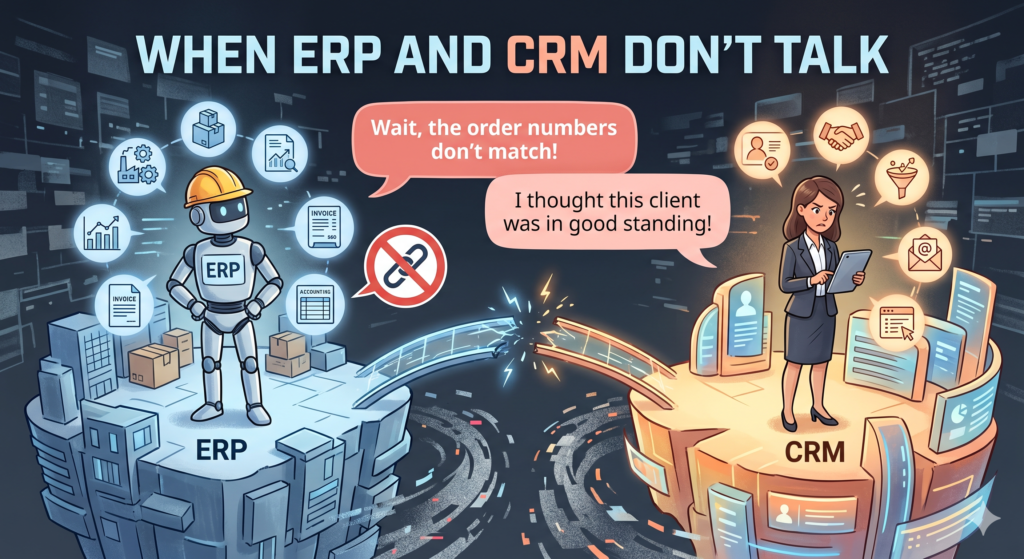
Consider a mid-to-large enterprise — a manufacturing or distribution company running SAP S/4HANA as their ERP backbone and Salesforce Sales Cloud as their customer engagement and CRM platform. This combination is extremely common across industries including industrial manufacturing, consumer goods, life sciences, and professional services.
In this scenario, the business processes 2,000–5,000 sales orders per day through SAP. Meanwhile, their sales, customer success, and account management teams live in Salesforce. The critical question becomes: how does SAP order data reach Salesforce in a way that is accurate, timely, and reliable?
The Pain Points We Commonly Encounter
In our experience studying and architecting integrations for this landscape, here are the pain points that consistently emerge:
- Sales reps have no real-time visibility into SAP order status inside Salesforce — order confirmations are delayed by hours, leading to repeated customer inquiries and eroded trust.
- Manual data export/import processes: teams extract order data from SAP into spreadsheets and re-enter it into Salesforce — a slow, error-prone, and entirely avoidable process.
- Data discrepancies accumulate over time. When SAP and Salesforce are not continuously synchronized, conflicting records lead to incorrect invoicing, shipping errors, and SLA breaches.
- Order amendments and cancellations made in SAP are invisible to Salesforce users until someone manually updates them — sometimes taking 24 hours or more.
- No audit trail. Without automated logging, there is no reliable record of what data moved when, making compliance reporting a manual, time-consuming exercise.
| Industry Insight: According to Gartner, organizations with poor data integration quality lose an average of $12.9 million annually. Real-time ERP-to-CRM integration is consistently cited as one of the highest-ROI integration investments for enterprise operations teams. |
3. Why Traditional Integration Approaches Fall Short
When organizations attempt to solve this problem without a modern iPaaS like SnapLogic, they typically choose one of two paths — and both lead to the same destination: a fragile, expensive, unmaintainable integration.
Path 1: Custom Code (SAP ABAP + Salesforce APIs)
- Custom ABAP programs and RFC calls are written to extract SAP order data and POST it to Salesforce REST APIs. This works initially — until Salesforce releases a seasonal API update that breaks the integration.
- Zero error handling framework. Failed records are silently dropped and discovered only during weekly reconciliation.
- No scalability. When order volumes spike, the custom code times out or overwhelms Salesforce API governor limits.
- High maintenance cost. Every business rule change requires a development ticket, a testing cycle, and a deployment window.
Path 2: Batch ETL (On-premise Informatica, legacy MuleSoft, or SSIS)
- Batch-based processing means data in Salesforce is always stale — typically 3–6 hours behind SAP. Real-time visibility is impossible.
- On-premise ETL servers require dedicated infrastructure, patching, and a full-time administrator. Cloud scalability is non-existent.
- Limited native SAP connectivity — most legacy ETL tools require JDBC workarounds that bypass SAP’s proper RFC/BAPI layer, creating data integrity risks.
- Any change to the integration requires a full development cycle — no self-service capability for business users or integration operations teams.
The root problem with both approaches is the same: they treat integration as a one-time development project rather than a managed, scalable platform capability. SnapLogic’s cloud-native iPaaS architecture fundamentally changes this equation.
4. Our Recommended Architecture
Here is how NexInt AI would architect a real-time SAP-to-Salesforce order sync integration using SnapLogic. This architecture follows enterprise integration best practices and is designed for scalability, fault tolerance, and operational maintainability.
Architecture Overview — Three Integration Layers
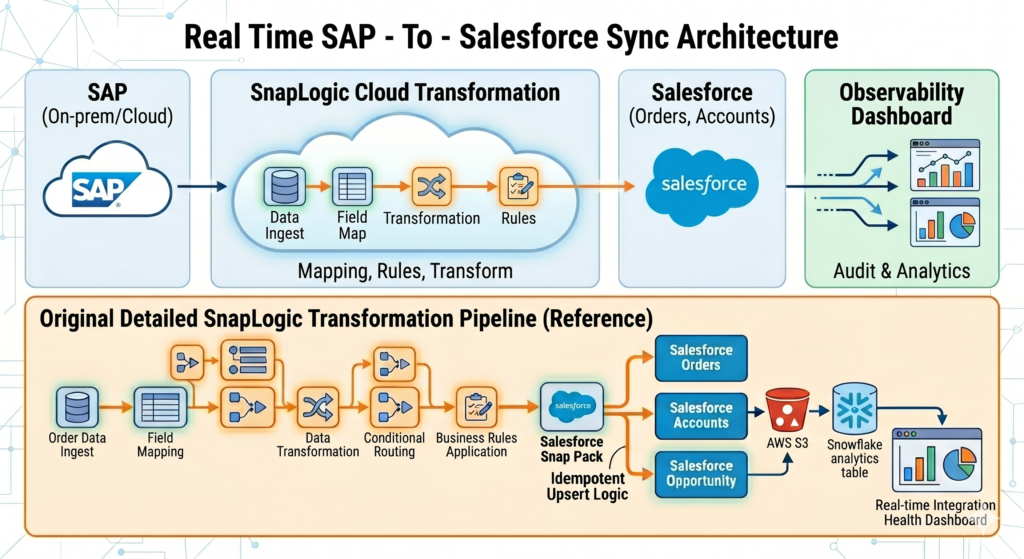
| SnapLogic Integration Architecture: SAP to Salesforce |
| Layer 1 — Secure Source Extraction: SAP S/4HANA (RFC/BAPI calls) via SnapLogic Groundplex agent deployed in the client’s on-premise or private cloud network. |
| Layer 2 — Cloud Transformation & Routing: SnapLogic Cloudplex pipelines handling field mapping, data transformation, conditional routing, and business rule application. |
| Layer 3 — Target Delivery & Confirmation: Salesforce Snap Pack delivering records to Salesforce Orders, Accounts, and Opportunity objects with idempotent upsert logic. |
| Supporting Layer — Observability: Structured audit logs written to AWS S3 + Snowflake analytics table, powering a real-time integration health dashboard. |
5. Step-by-Step Pipeline Design
We structure this integration as four modular SnapLogic pipelines — each with a single, well-defined responsibility. This approach mirrors microservices design principles applied to integration: every pipeline is independently testable, deployable, and maintainable without affecting the others.
Pipeline 1: SAP Order Extraction Pipeline
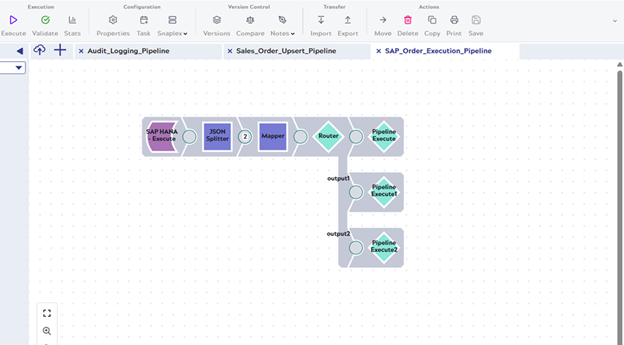
Trigger: SnapLogic Scheduler — every 5 minutes during business hours, configurable via pipeline parameters stored in SnapLogic’s secret vault.
- SAP Execute Snap: Invokes SAP BAPI_SALESORDER_GETLIST with a delta timestamp parameter to retrieve only orders created or modified since the last successful pipeline run. The delta timestamp is persisted in a SnapLogic pipeline parameter managed by a lightweight state-tracking pipeline — this is critical to prevent duplicate processing.
- JSON Splitter Snap: Splits the JSON array into individual order documents. This is one of the most important design decisions — individual document flow means a single bad record cannot block the entire batch. Each order processes independently.
- Mapper Snap — Field Normalization: Standardizes SAP field names to a canonical integration model (e.g., VBELN → OrderNumber, KUNNR → AccountExternalID), applies data type conversions (SAP date format YYYYMMDD → ISO 8601), and adds pipeline metadata (source_system, extraction_timestamp, pipeline_run_id) for full traceability.
- Router Snap: Routes each record to one of three downstream processing paths based on the SAP order change indicator (UPDKZ field): (a) New Order → Salesforce Create flow, (b) Modified Order → Salesforce Update flow, (c) Cancelled Order → Salesforce Cancel/Close flow. This eliminates conditional logic scattered across multiple pipelines.
Pipeline 2: Salesforce Order Upsert Pipeline
Handles both order creation and updates through a single idempotent Upsert operation, using the SAP Order Number as the Salesforce external ID. This design means the pipeline is safe to re-run — duplicate processing will update rather than create duplicate records.
- Mapper Snap — Salesforce Field Mapping: Maps normalized integration model fields to exact Salesforce API field names. Handles lookup relationship resolution — for example, the Salesforce AccountId is resolved from the SAP Customer Number using a secondary Salesforce Query Snap lookup before the upsert.
- Salesforce Upsert Snap: Configured with External ID field = SAP_Order_Number__c. Batch size set to 200 records per API call to optimize Salesforce API governor limits. Built-in retry logic: 3 attempts with exponential backoff (2 seconds, 4 seconds, 8 seconds) for transient API failures.
- REST Snap — Real-Time Notification: On successful upsert, triggers a REST POST to an internal notification webhook that alerts the relevant sales rep of an order status change — enabling near-instant visibility in Salesforce without polling.
- Error Pipeline Execute Snap: Any record-level failure is routed to the dedicated Error Handling Pipeline (Pipeline 4) rather than failing the entire batch. This is the key architectural decision that delivers resilience.
Pipeline 3: Audit Logging Pipeline
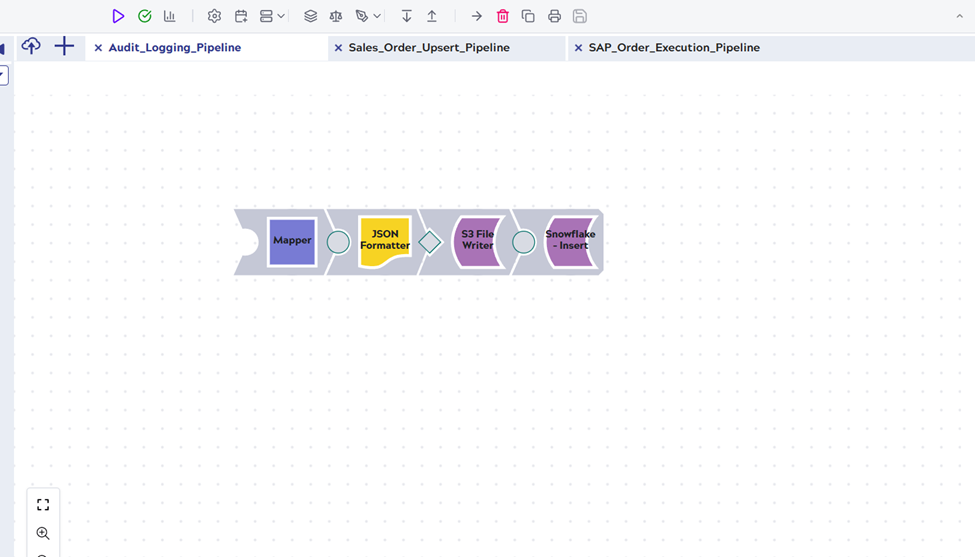
Every pipeline execution, successful or failed, writes a structured audit record to both AWS S3 and Snowflake. This is not optional in an enterprise context — it is the foundation of operational transparency and compliance.
- Mapper Snap — Audit Record Construction: Builds a structured JSON audit document containing: pipeline_name, run_id, start_time, end_time, records_processed, records_succeeded, records_failed, error_codes_summary.
- AWS S3 File Writer Snap: Writes the audit JSON to a time-partitioned S3 path (s3://integration-audit/{client}/{YYYY}/{MM}/{DD}/{run_id}.json). This structure enables point-in-time recovery, forensic investigation, and long-term retention for compliance.
- Snowflake Insert Snap: Inserts the audit record into a Snowflake integration_run_log table that powers the real-time monitoring dashboard visible to both IT operations and business stakeholders.
Pipeline 4: Error Handling & Recovery Pipeline
In our view, this is the most important pipeline in the entire architecture — and the most commonly omitted in poorly designed integrations. A robust error handling framework is what separates a production-grade integration from a prototype.
- Error Pipeline Snap — Global Handler: Configured at the SnapLogic project level to intercept unhandled errors from all pipelines. Captures full error context: error_code, error_message, the original document payload, pipeline_name, snap_name, and timestamp.
- Mapper Snap — Dead Letter Record: Enriches the failed record with error classification, a unique dead_letter_id, retry_count, and first_failed_timestamp. This metadata is essential for the operations team to prioritize and resolve failures efficiently.
- AWS S3 File Writer Snap — Dead Letter Queue: Routes failed records to a dedicated dead-letter folder in S3. Records are retained for 90 days. The operations team can re-submit individual records for reprocessing after root cause investigation.
- REST Snap — Alert Notification: Triggers a POST to PagerDuty for critical failures (SAP connectivity loss, Salesforce API limit breach). Non-critical data validation failures trigger a structured email summary. Alert classification prevents alert fatigue.
- Pipeline Execute Snap — Auto-Retry: For transient failures (HTTP 429, 503, network timeout), the error pipeline automatically invokes a retry sub-pipeline with the original document payload — up to 3 retry attempts within a 15-minute window before escalating to the dead-letter queue.
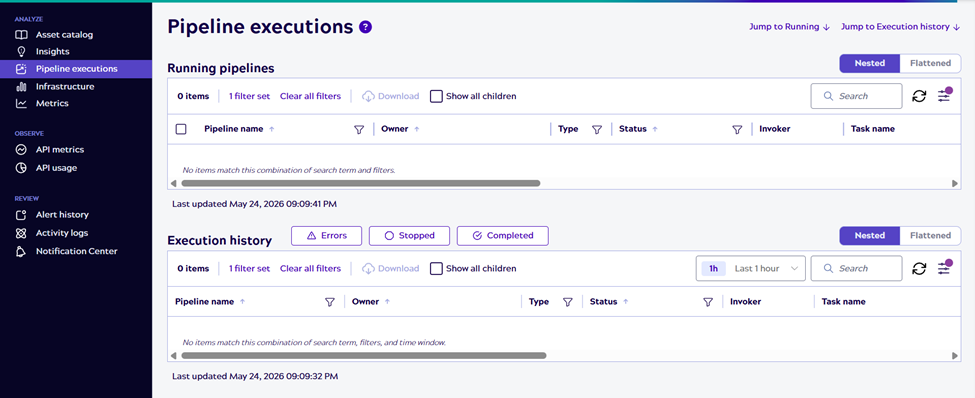
SnapLogic Dashboard: The Monitoring tab showing pipeline execution history, success/failure rate chart, and data volume metrics. This communicates operational maturity.
7. Error Handling & Monitoring Framework
Three-Class Error Handling Strategy
A critical design principle we follow at NexInt AI: not all errors are equal, and treating them equally leads to unnecessary alert fatigue and missed critical failures. Our recommended approach classifies every error into one of three categories:
| Error Class | Examples | Our Recommended Handling Strategy |
| Transient / Recoverable | HTTP 429 (Rate Limit), 503 (Service Unavailable), Network Timeout | Auto-retry with exponential backoff: 3 attempts (2s, 4s, 8s). PagerDuty alert only if all retries exhausted. No manual intervention required for typical occurrence. |
| Data / Validation | Missing required Salesforce field, SAP data type mismatch, duplicate external key | Route to dead-letter S3 queue. Log full payload + error context to Snowflake. Email notification to integration ops team. Available for manual review and re-submission. |
| System / Critical | SAP RFC connection failure, Salesforce OAuth token expired, Groundplex agent down | Immediate PagerDuty P1 alert. Pipeline execution halted. On-call integration engineer paged. Runbook URL embedded in alert payload. |
Real-Time Monitoring Dashboard
The Snowflake-powered monitoring dashboard we include in this architecture provides the following operational visibility — for both IT teams and business stakeholders:
- Live pipeline execution status: running / succeeded / failed — refreshed every 5 minutes
- Records processed per hour — time-series chart for volume trend detection and anomaly alerting
- Error rate trending — automatic alert triggered when error rate exceeds a configurable threshold (e.g., 2%) in any rolling 1-hour window
- SAP-to-Salesforce data latency metric — average time from SAP order creation event to Salesforce record visibility
- Dead-letter queue depth — count of failed records pending human review and reprocessing
- SLA compliance percentage — orders synced within the target latency SLA (e.g., 5-minute threshold), tracked daily and weekly
This level of observability is what transforms integration from a black box into a managed, measurable platform — and it is something we design into every NexInt AI engagement from day one, not as an afterthought.
8. Expected Business Outcomes
Based on industry benchmarks, SnapLogic platform capabilities, and our deep understanding of this integration pattern, here are the realistic business outcomes enterprises can expect when replacing a manual or batch-based SAP-Salesforce integration with this SnapLogic architecture:
| Integration Metric | Typical Manual/Legacy State | Expected Outcome with SnapLogic |
| Order processing time | 4–6 hours (manual batch cycle) | Under 5 minutes (near real-time) |
| Manual effort (FTE) | 6–8 FTE for data entry & reconciliation | < 1 FTE for exception management only |
| Data error rate | 3–5% (manual entry errors) | < 0.5% (automated validation) |
| Integration failure rate | 10–15% (no retry or error handling) | < 1% (with auto-retry framework) |
| Order status visibility | Delayed 4–6 hours in Salesforce | Real-time (< 5 minute latency) |
| Monitoring & alerting | None (failures discovered reactively) | Real-time dashboard + proactive PagerDuty alerts |
| Compliance audit time | 2–3 days per quarterly audit | Hours (automated S3 + Snowflake audit trail) |
| Integration maintenance cost | High (dedicated developer per change) | Low (self-service Mapper/Router config) |
| These outcomes are based on published industry data from Gartner, Forrester, and SnapLogic’s own customer benchmark reports, combined with NexInt AI’s architectural analysis of this integration pattern. Actual results will vary by organization size, data volume, and existing system configuration. |
9. Why NexInt AI for Your SnapLogic Integration
NexInt AI is a dedicated SnapLogic integration services firm. We are not a generalist IT company with a SnapLogic practice on the side — integration architecture is our core competency, and SnapLogic is our platform of choice for enterprise-grade integration challenges.
Our team brings deep expertise across the full SnapLogic engagement lifecycle:
| NexInt AI SnapLogic Service Offerings |
| SnapLogic Pipeline Development: End-to-end integration design and build — from architecture blueprinting through production deployment. We follow enterprise integration patterns and SnapLogic best practices from day one. |
| SnapLogic Enhancement & Optimization: Performance tuning, error handling upgrades, and modernization of existing SnapLogic environments — including Ultra Pipeline migration and pipeline consolidation. |
| SnapLogic Migration Services: Structured migration from legacy ETL tools (MuleSoft, Informatica, Dell Boomi, TIBCO, custom ABAP code) to SnapLogic. We bring proven migration accelerators and a phased approach that minimizes business risk. |
| Cloud & Hybrid Integration: Expert connectivity between cloud SaaS platforms (Salesforce, Workday, Coupa, ServiceNow) and on-premise enterprise systems (SAP, Oracle EBS, JD Edwards) using SnapLogic’s Groundplex hybrid architecture. |
Our architects have designed integrations across the SAP ecosystem (S/4HANA, ECC, BW, Ariba), Salesforce (Sales Cloud, Service Cloud, Revenue Cloud), Workday, Coupa, Snowflake, AWS, Azure, and 40+ enterprise SaaS applications. We understand not just the technical connections, but the business processes these integrations must serve.
We believe in being transparent with our clients: we are a growing firm building our project portfolio, and we bring enterprise-level architectural thinking to every engagement regardless of its scale. If you want a SnapLogic partner who will treat your integration as their own — with the care, rigor, and long-term thinking it deserves — NexInt AI is the right choice.
10. Ready to Modernize Your Enterprise Integration?
If your organization is facing any of the following, NexInt AI can help you design and deliver a solution:
- Manual data synchronization between SAP, Salesforce, Workday, Coupa, or any other enterprise system
- Batch integration that leaves your teams working with stale, delayed data
- Legacy ETL tools (MuleSoft, Informatica, SSIS) that are expensive to maintain and impossible to scale
- A SnapLogic environment that needs optimization, better error handling, or expanded coverage
- A greenfield integration platform initiative where you need an experienced SnapLogic architecture partner
We offer a complimentary Integration Architecture Consultation for enterprise clients — a focused 60-minute session with a senior NexInt AI SnapLogic architect to assess your integration landscape, discuss your challenges, and explore what a modern SnapLogic-based solution would look like for your specific environment. No commitment required.
| Start Your SnapLogic Journey with NexInt AI Book a free 60-minute Integration Architecture Consultation. No sales pitch. Just honest architectural advice from people who live and breathe SnapLogic. Book Your Free Consultation → nexintai.com SnapLogic Development | Migration | Enhancement | Support | API Integration |
This blog represents NexInt AI’s architectural expertise and recommended approach for this class of enterprise integration. The scenario is illustrative and based on widely documented enterprise integration patterns.
© 2025 NexInt AI | nexintai.com | All rights reserved.