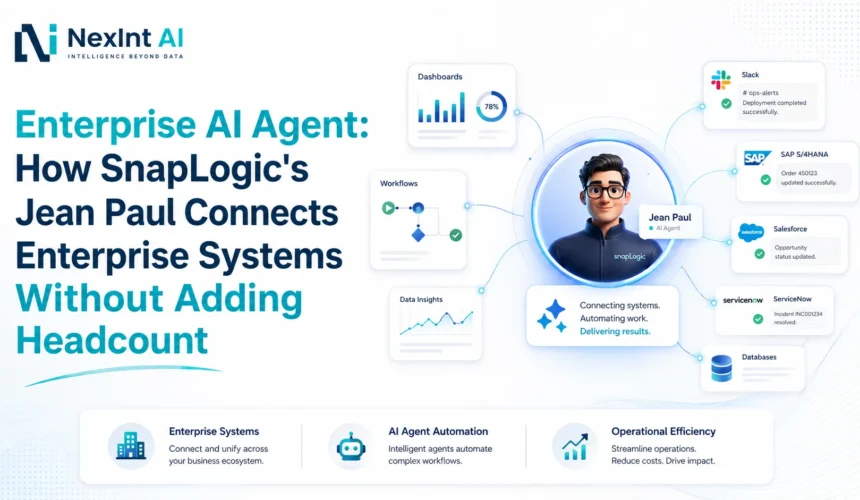
I have seen how SnapLogic built Jean-Paul. It is a useful example for anyone planning an Enterprise AI Agent. Many AI assistants can answer a question but enterprise workers need more. They want an assistant that can read the CRM, check support tickets, pull usage data and deliver one report instead of opening four browser tabs of raw information. The gap between a chatbot and a true Enterprise AI Agent is rarely about the intelligence of the model; it is about granting access to the systems, tools, workflows and permissions that work together. This is the point where Internal AI Agent projects either succeed or stall. SnapLogic set out to prove this idea with its agent, Jean-Paul. Before any organization starts AI Agent Development, the Jean-Paul story is worth studying because it shows what a connected governed agent can do whether the enterprise sits in Chennai, Tamil Nadu or else builds an AI roadmap.
The Problem Jean-Paul Was Built to Solve
SnapLogic’s go-to-market teams had customer information scattered across Salesforce, Zendesk, BigQuery, Chorus, ZoomInfo, and more. According to SnapLogic’s own case study, preparing a single quarterly business review meant manually pulling data from roughly five systems and assembling it by hand, a process that consumed 8–10 hours per review. Pipeline analyses and account reports sat in queues, and senior revenue talent spent more time formatting documents than talking to customers. This is a textbook case for an Internal AI Agent: high-value people spending their time assembling information instead of acting on it.
Why SnapLogic Put the Agent Inside Slack
SnapLogics AgentFest 2026 recap describes Jean-Paul running inside Slack. The idea is simple: adoption improves when AI lives where people already work, with no separate application to learn and no context switching. SnapLogics later case study notes Jean-Paul is now also reachable through Microsoft Teams, email and API. Slack was the starting channel, not the source of its intelligence. That difference matters for any Internal AI Agent design: the channel is a delivery mechanism. The real capability lives in the integration and reasoning layers behind it.
The Architecture Behind the Agent
SnapLogic has not released its internal design so read what follows as a guide, not a copy of the real system. A functional Enterprise AI Agent needs parts. First a user interface, such, as Slack, Teams, email or a custom internal app lets people talk to the agent. Next,. Permissions control who is allowed to make requests. Then an AI reasoning layer plans the tasks; in SnapLogic’s example this layer is called Jean‑Paul. Uses Anthropic’s Claude. After that a tool and integration layer connects CRM, support and data‑warehouse systems. Then an orchestration layer strings together steps. The output layer delivers the report or action. Finally an audit layer records every request. In short, a model plus tools plus integration plus permissions equals an agent that finishes work.
Why 15 Connected Systems Matter More Than a LLM
SnapLogic reports that Jean‑Paul connects to 15 internal systems with access to 45 tools.No single system holds an answer to a real business question. A renewal‑call brief needs CRM history, support tickets, usage data and prior call notes at once.That is why AI Agent Integration, across 15 Connected Systems, not a bigger LLM turns a chatbot into a working agent.
Tools, Governance and the Read/Write Decision
Tools are controlled abilities. A tool can search an account, pull a usage report or draft a document. The system is where information lives. The tool is what an agent can do with that information. This difference is key in AI Agent Architecture. Read actions, which simply retrieve data carry risk. Write actions, which update records send messages or trigger workflows carry risk and usually need approval gates. Governance keeps these risks in check. The Read/Write Decision tells the agent when it can write. The safest route for any Internal AI Agent starts with read- tasks. Add actions only, after trust and monitoring have matured.
A Blueprint for Building the Agent
Treat AI Agent Development as a series of steps, not a one‑time launch.Choose a high-value repetitive workflow instead of tackling the entire enterprise.Measure how hours the current manual effort takes.Map which systems contain the needed data and turn each required action into a governed tool.Define access rules that inherit the existing enterprise permissions and build the orchestration logic that decides which tool runs at what time.Design a finished deliverablea report or brief than a list of search results.Test the deliverable, against scenarios measure the time saved and the adoption rate then expand by reusing the same tools for the next workflow.
Why the Integration Layer Comes First
SnapLogics case study shows that fast deployment happens because there is an integration foundation in place. Live connectors to Salesforce, Zendesk and BigQuery mean that no system had to be built from the beginning. Enterprises should check existing connectivity and authentication before spending a lot on agent tooling; a solid data engineering foundation is what makes deployment quicker, than a long project that takes many months.
How to Calculate AI Agent ROI
You can use a formula: Annual Value equals Time Saved plus Avoided Tool or Consulting Cost plus Measurable Revenue Impact minus Operating Cost. Time Saved is the number of hours that are recovered multiplied by the cost of an employee. Operating Cost covers the cost of using the model connecting it to systems and watching it run. SnapLogic said Jean‑Paul saw a 30 percent rise in sales productivity, which the company linked to a 37 times return. That figure comes from SnapLogic’s data, not from a wider industry study. The real return on an Enterprise AI Agent depends on how mature the integration’s which use‑case is chosen and how well it is adopted.
What SnapLogic Actually Reported
Two SnapLogic publications, from different measurement periods, should never be merged. AgentFest 2026 , SnapLogic reported 15 connected systems, 45 tools, a 30% sales productivity increase, and a 37x ROI. Its later Jean-Paul case study, covering a separate four-month window, reported 2,141 hours recovered in one 30-day period (~12.5 FTE-equivalent capacity), 1,630 requests handled, 281 production-quality documents, over $3M in estimated value across 17 departments, and $380K–$540K in annual cost avoidance, with 1–3 day deployment.
What SnapLogic Actually Reported
Two SnapLogic publications, from different measurement periods, should never be merged. AgentFest 2026 , SnapLogic reported 15 connected systems, 45 tools, a 30% sales productivity increase, and a 37x ROI. Its later Jean-Paul case study, covering a separate four-month window, reported 2,141 hours recovered in one 30-day period (~12.5 FTE-equivalent capacity), 1,630 requests handled, 281 production-quality documents, over $3M in estimated value across 17 departments, and $380K–$540K in annual cost avoidance, with 1–3 day deployment.
Common Mistakes to Avoid
Starting with many systems at once. Building a chatbot of a workflow agent. Granting write access, before governance is proven. Ignoring user-level permissions. Skipping a tool-level audit trail. Attempting AI Agent Development before the integration foundation exists. Measuring demo quality of real business value.
Which Workflows Make a Good First Agent?
Good first candidates are cross-system, information-heavy and easy for a human to verify. Account preparation, customer-success review prep, internal knowledge retrieval and operational reporting. Not every AI Agent Development effort will start where Jean-Pauls did. That is fine.
How NexInt AI Solutions Can Help
NexInt did not build Jean-Paul and has no role in SnapLogics deployment. It is used here as verified evidence of what a connected agent can achieve. NexInt does offer the foundation this kind of agent requires: AI solutions and automation design , reliable data access through data engineering, organised knowledge management and g generative AI and LLM development delivered through discovery, design, and build. The path is the same, for any enterprise: connect systems, define governed tools, add reasoning, govern actions, measure value and scale.
Frequently Asked Questions
01.
What is an internal enterprise AI agent?
02.
What did SnapLogic’s Jean‑Paul actually do?
03.
Should an AI agent be allowed to update business systems?
04.
How do businesses calculate AI Agent ROI?
05.
What is the best first use case for an enterprise AI agent?
Conclusion
An Enterprise AI Agent does not become valuable simply because it can chat. Its value comes from its ability to safely reach the systems where work lives use governed tools that combine context and hand back finished work. SnapLogics Jean‑Paul is an example of that principle. The blueprint: choose one workflow, connect the required systems, expose controlled tools, add AI reasoning, govern every action, measure results and reuse the foundation to scale. If your organisation in Chennai, Tamil Nadu or, across India is evaluating Internal AI Agent and AI Agent Development options, NexInt AI Solutions can help you build that foundation. Get in touch to talk through your architecture.